Installation Guide Features Privacy FAQ DOWNLOAD

Drop it now.
Deal with it later.

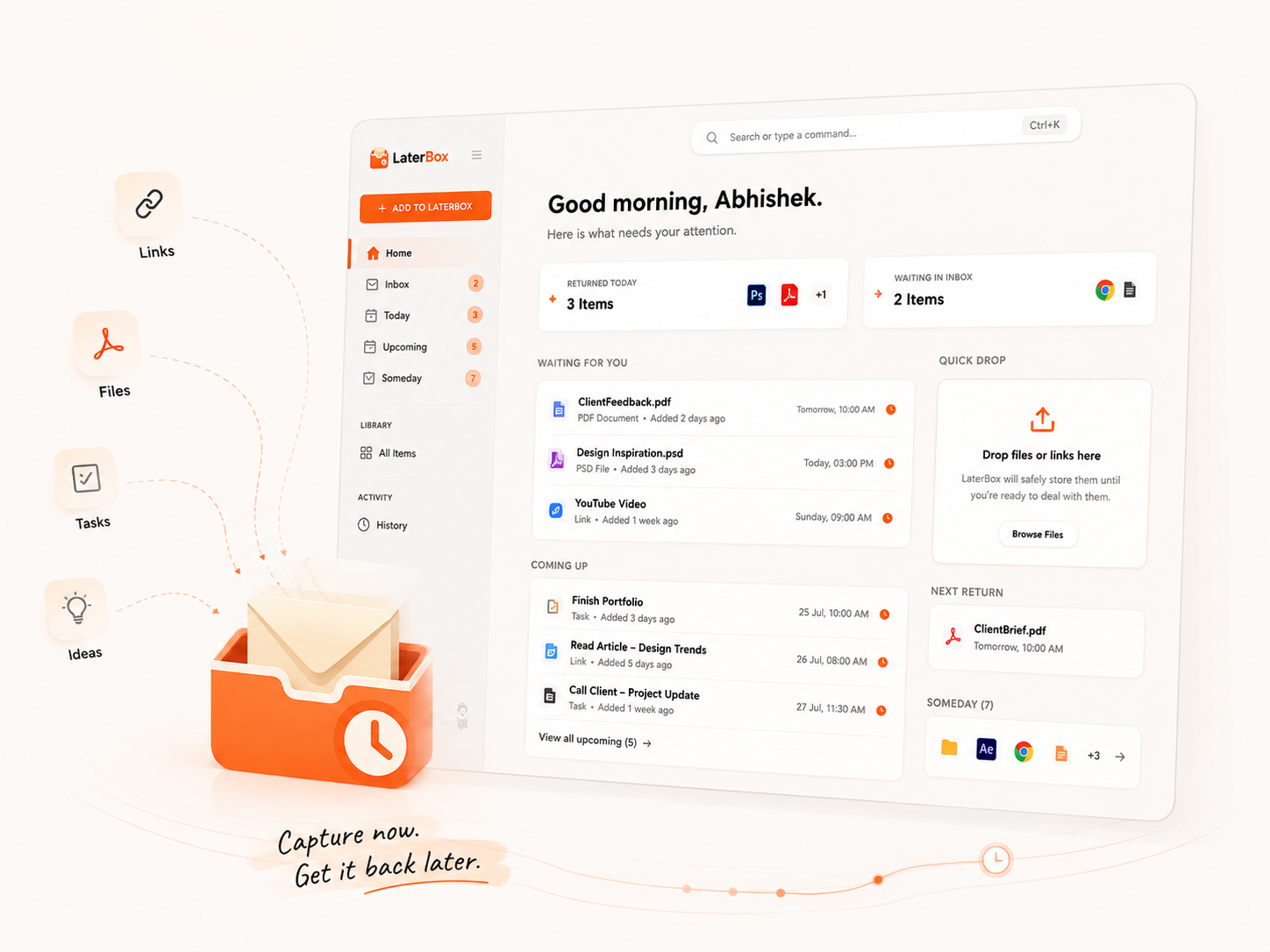
Save files, links, tasks, and ideas for later.
We'll bring them back when you're ready.
FreeOfflineNo account required
Made by Nexaura Dev.
TRY IT ↓
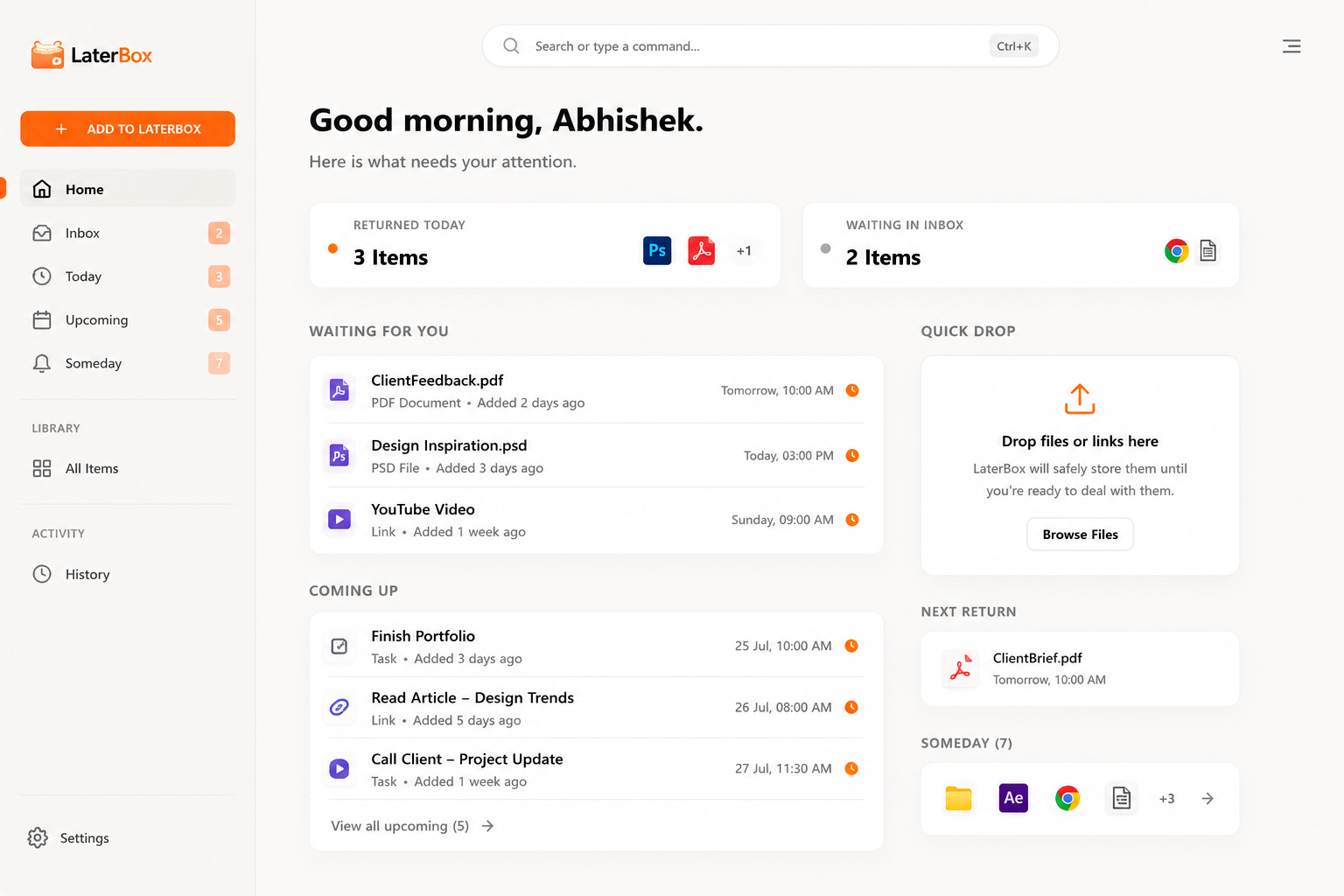
LaterBox Application UI

WE ALL HAVE A PLACE CALLED
"LATER."

"I'll watch it later."

WATCH LATER

"I'll read it later."

BOOKMARKS

"I'll finish it later."

DOWNLOADS

"I'll reply later."

OPEN TABS

Most things we save for later
never find their way back.

Later shouldn't
mean lost.
Browser tab
PDF
Website.psd
Client Folder
Screenshot.png
Send Invoice
Quick Note

ONE PLACE FOR
EVERYTHING LATER.

STEP 01

DROP IT.

Files.
Links.
Tasks.
Ideas.
Anything.

STEP 02

CHOOSE WHEN.

Later today.
Tomorrow.
Weekend.
Someday.
Or whenever you want.

STEP 03

FORGET ABOUT IT.

Get it out of your head without losing it.

STEP 04

IT COMES BACK.

Right when you need it.

Invoice.pdf
LaterBox Drop Here
WHEN DO YOU NEED IT?
Later Today
Tomorrow Enter
This Weekend
Someday
LaterBox
Safely stored for later.
RETURNED FROM LATERBOX

ClientFeedback.pdf

You left this for today

When later
becomes now.

RETURNED FROM LATERBOX
YOU LEFT THIS FOR TODAY

Finish Website Design

Website.psd
10:00 AM
30 MIN 1 HOUR TONIGHT TOMORROW WEEKEND

Not another
to-do list.

LaterBox doesn't just remind you what to do.
It brings back the actual thing.

FILES
ClientPoster.psd LB OPEN IN PHOTOSHOP
LINKS
YouTube Video LB OPEN IN BROWSER
FOLDERS
Client Project LB OPEN IN EXPLORER
TASKS
Send Invoice LB DO IT
IDEAS
Short Film Concept LB REMEMBER IT

Some things
don't need a deadline.

A movie. A book. An idea. A course. A project you might return to.

Not everything needs a reminder. Some things just need somewhere safe to wait.

WATCH A documentary
READ Creative Confidence
TRY Blender
BUILD Short Film Idea
LEARN Motion Design
SOMEDAY.
No deadline. Still remembered.

Designed to stay
out of your way.

LaterBox Interface

Your LaterBox.
Your rules.

  • Launch at Windows Startup
  • Close to System Tray
  • Light / Dark / System Theme
  • Global Quick Capture Shortcut
  • Reminders
  • Local Data
LaterBox Settings
CTRL + SHIFT + L

What do you want to deal with later?

|
SAVED.

LaterBox is always
one shortcut away.

Your things stay
where they belong.

ON YOUR COMPUTER.

100% OFFLINE CORE

LaterBox works without an internet connection.

NO ACCOUNT

Install it and start using it.

LOCAL-FIRST

Your tasks and references stay on your device.

No AI required No cloud dependency No unnecessary tracking Lightweight Built for Windows
Tabs
Bookmarks
Notes
Reminders
Desktop clutter
vs
LaterBox

Less mental clutter.
Not more software clutter.

LaterBox is designed to be a quiet utility — fast when you need it and out of the way when you don't.

The Ultimate Windows Productivity Organizer

Instant Local Capture

Stop losing track of important files and links. With LaterBox, simply press Ctrl + Shift + L to bring up the global quick capture interface from anywhere in Windows. You can paste URLs, drop heavy PSDs, or type quick notes. Everything is securely referenced on your local machine instantly, eliminating cloud upload wait times and keeping your workflow completely uninterrupted.

Smart Return Scheduling

Don't let your "save for later" pile become a black hole. When you capture an item, LaterBox prompts you to choose exactly when you want to deal with it. Select "Later Today," "Tomorrow," or pick a specific date. By assigning a time immediately, you ensure that every file, task, and link is resurfaced precisely when you have the mental bandwidth to handle it.

Contextual Reminders

When later becomes now, LaterBox gently notifies you through the Windows system tray. But it doesn't just remind you what to do—it brings back the actual item. Your reminder card includes the exact file or link you saved, alongside the original context you provided, so you can pick up exactly where you left off without digging through folders or browser history.

Seamless Application Handoff

LaterBox understands the tools you use. Because it's a native, local-first Windows application, clicking a reminder instantly opens the file in your default desktop software. A PSD opens directly in Photoshop, a PDF in your reader, and a local project folder directly in Windows Explorer. It's the frictionless bridge between capturing an idea and actually executing it.

Guilt-Free Snoozing

Productivity shouldn't be stressful. If a scheduled item returns but you're in the middle of deep work, simply hit snooze. You can easily push tasks to the weekend or send them back to the queue for another day. LaterBox keeps your current workspace clean while guaranteeing your items won't be lost in the shuffle of daily distractions.

Track Your Accomplishments

Every item you complete is safely logged in your History archive. This provides a clear, searchable record of what you've handled, the links you've read, and the files you've processed. It's a powerful way to review your productivity patterns and retrieve old references that you might need again in the future.

The Someday Stack

Not everything needs a deadline. The Someday stack is your dedicated repository for inspiration, long-term goals, and interesting reads that don't require immediate action. It keeps your daily "Today" view laser-focused and actionable, while ensuring those brilliant ideas and references are safely stored away for when you finally have free time.

You don't need to
do everything now.

You just need to know
you won't forget it later.

That's what LaterBox is for.

FAQ

LaterBox is a lightweight Windows application that acts as a unified capture space for anything you can't deal with right now, bringing it back to your attention when the time is right.

No. LaterBox is completely offline and works locally on your machine.

No account is required. Just download, install, and start using it immediately.

No. Your files never leave your computer. LaterBox simply references them locally.

No. When you drop a file into LaterBox, it creates a fast shortcut/reference to the original file, saving your storage space.

Files, folders, URLs, text snippets, and tasks. Practically anything you can drag and drop or copy.

Yes, you can drop individual files or entire project folders.

Yes, drag a URL from your browser or use the quick capture shortcut to save links for later.

LaterBox will gently notify you, and the item will appear in your 'Today' view, ready to be opened.

Yes, you can easily snooze items again if you're still not ready to deal with them.

Someday is a dedicated space for things you want to keep and remember, but don't have a specific deadline for.

Yes, the core LaterBox application is completely free to use.

LaterBox is currently built exclusively for Windows.

Drop it now.
Deal with it later.

DOWNLOAD FOR WINDOWS DOWNLOAD FOR MAC
FreeOfflineNo account required
Made by Nexaura Dev.

Privacy Policy

Last Updated: July 24, 2026

At Nexaura Dev, we believe that your data is fundamentally yours. We have built LaterBox from the ground up with privacy as a core principle. This Privacy Policy outlines what little data we interact with and how we keep your workflow secure.

1. The Local-First Promise

LaterBox is a "local-first" application. This means that every file, link, note, and task you capture is processed and saved entirely on your local machine. Your data is stored in a secure SQLite database located within your Windows user directory. We do not have servers that sync, store, or analyze your data. What happens on your machine, stays on your machine.

2. What We Don't Collect

Because we do not use cloud synchronization, we have zero access to your saved content. Furthermore, we explicitly do not collect:

3. Third-Party Network Requests

LaterBox is designed to work completely offline. However, there is one specific feature that requires an internet connection: Metadata Fetching. When you save a URL (link), LaterBox may briefly reach out to the target website to fetch its title and favicon so it looks nice in your list. This request happens directly between your machine and the target website; it does not route through Nexaura Dev servers.

4. Changes to this Policy

We may update this privacy policy from time to time as we add new features. If we ever decide to add optional cloud-syncing features in the future, it will be strictly opt-in, and this policy will be updated to reflect exactly how that data is handled with end-to-end encryption. Until then, you can rest assured that your data is safe on your own hard drive.


Back to Home

About Nexaura Dev

We are Nexaura Dev, a small, independent team of developers, designers, and workflow obsessives dedicated to building quiet, focused, local-first tools for Windows power users.

The Problem with Modern Software

Somewhere along the line, software became too loud. Every app wants to live in the cloud, requires a monthly subscription, sends you push notifications, and tracks your every click to satisfy their analytics dashboards. We got tired of feeling like we were renting our tools instead of owning them.

We built LaterBox because we needed a simple, blazing-fast utility to manage our own chaotic workflows. We constantly found ourselves finding interesting articles, necessary files, and random thoughts that we didn't have time to deal with *right now*, but didn't want to lose forever. We wanted a digital "junk drawer" that was actually organized.

Our Philosophy

Drop it now. Deal with it later.

We believe tools should get out of your way. They should open instantly, do exactly what you expect them to do, and then disappear until you need them again. We also believe that you shouldn't have to pay a subscription fee just to save a link on your own computer.

The Future

LaterBox is just the beginning. We are committed to maintaining its lightweight, offline-first nature while expanding its capabilities to help you focus on what actually matters. Thank you for supporting independent software development.


Back to Home

Contact Us

We're always excited to hear from the people using our tools. Whether you've found a frustrating bug, have a brilliant idea for a new feature, or just want to say hello, our inbox is always open.

How to Reach Us

Email Support:
For technical support, bug reports, or account inquiries, please email us directly at dev@nexaurastudios.com.

Twitter/X:
For quick questions, feature suggestions, and updates on what we're building next, you can find us on Twitter at @NexauraDev.

Business Inquiries:
For press, partnerships, or business-related questions, please reach out to dev@nexaurastudios.com.

Response Times

We are a small team, but we pride ourselves on being highly responsive. You can typically expect a reply within 24-48 hours during regular business days (Monday - Friday, EST). If you're reporting a critical bug, we often respond much faster.


Back to Home

Terms of Service

Last Updated: July 24, 2026

Please read these Terms of Service carefully before using the LaterBox application operated by Nexaura Dev.

1. License to Use

By downloading and using LaterBox, Nexaura Dev grants you a revocable, non-exclusive, non-transferable, limited license to download, install and use the application strictly in accordance with the terms of this Agreement. You may use the software for both personal and commercial purposes.

2. Data Responsibility and Liability

Because LaterBox is a local-first application, all data you save is stored exclusively on your own hardware. You are solely responsible for backing up your LaterBox database and files.

In no event shall Nexaura Dev be liable for any direct, indirect, incidental, special, or consequential damages, including but not limited to, loss of data, loss of profits, or business interruption arising out of the use or inability to use the software. We are not responsible for data loss caused by hardware failure, accidental deletion, malware, or operating system upgrades.

3. "As Is" Software

The Application is provided to you "AS IS" and "AS AVAILABLE" and with all faults and defects without warranty of any kind. To the maximum extent permitted under applicable law, Nexaura Dev expressly disclaims all warranties, whether express, implied, statutory or otherwise, with respect to the Application, including all implied warranties of merchantability, fitness for a particular purpose, title and non-infringement.

4. Updates and Changes

We reserve the right to modify, suspend or discontinue, temporarily or permanently, the Application or any service to which it connects, with or without notice and without liability to you. We may also update these Terms of Service from time to time; continued use of the application constitutes acceptance of the new terms.


Back to Home
GUIDE

Installation Guide

How to install LaterBox on Windows and Mac

LaterBox is a brand new software. Because it is new, Windows Defender and macOS Gatekeeper might incorrectly flag it as untrusted or malicious. This is a common false positive for new desktop apps.

Windows Installation

When you run the .exe installer, Windows SmartScreen may show a blue warning saying "Windows protected your PC".


Mac Installation

When you open the application on macOS, you might see a warning that the app is damaged or cannot be opened because the developer cannot be verified.


Back to Home