Drop it now.
Deal with it later.
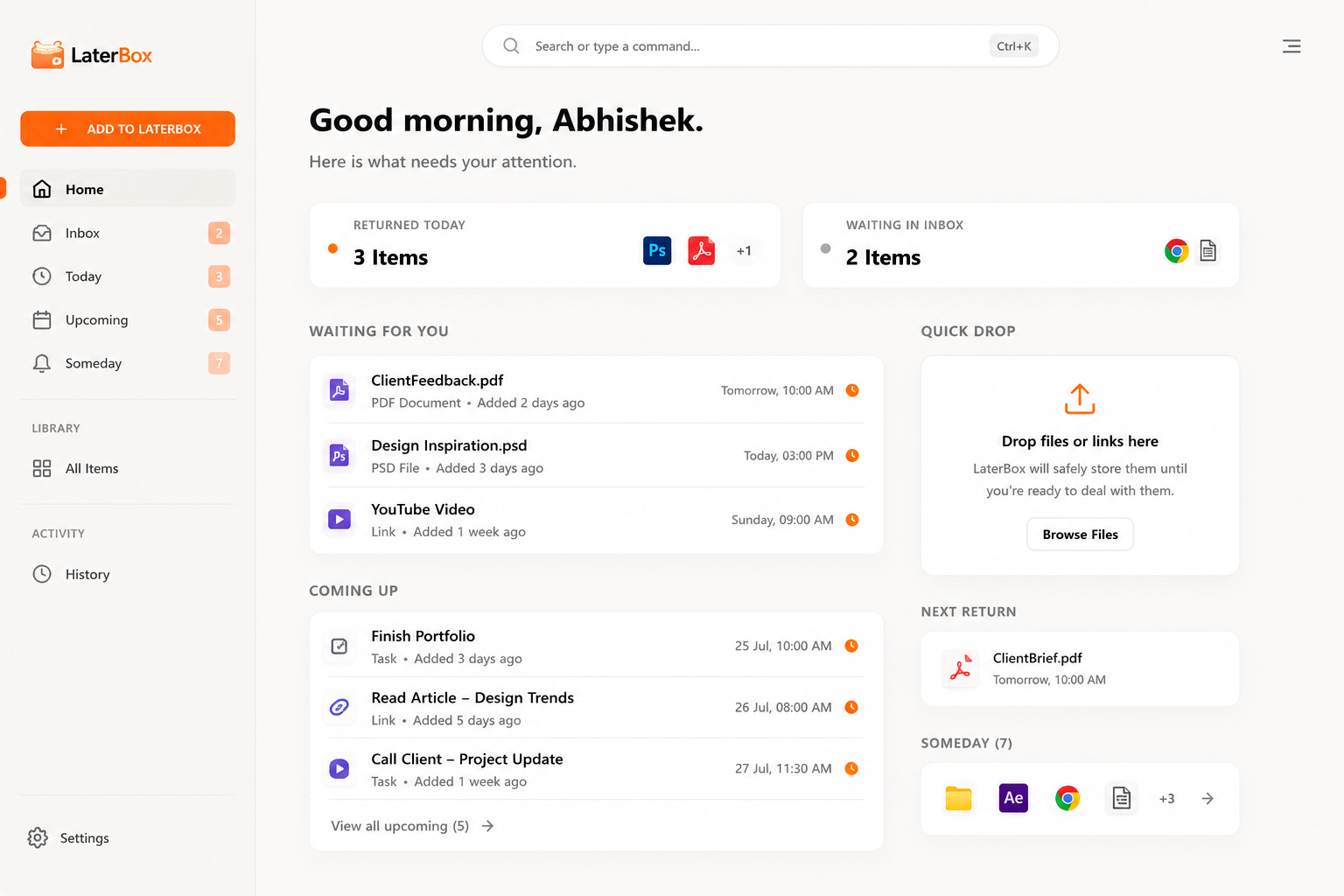
Save files, links, tasks, and ideas for later.
We'll bring them back when you're ready.
WE ALL HAVE A PLACE CALLED
"LATER."
"I'll watch it later."
WATCH LATER"I'll read it later."
BOOKMARKS"I'll finish it later."
DOWNLOADS"I'll reply later."
OPEN TABS
Most things we save for later
never find their way back.
mean lost.

ONE PLACE FOR
EVERYTHING LATER.
DROP IT.
Files.
Links.
Tasks.
Ideas.
Anything.
CHOOSE WHEN.
Later today.
Tomorrow.
Weekend.
Someday.
Or whenever you want.
FORGET ABOUT IT.
Get it out of your head without losing it.
IT COMES BACK.
Right when you need it.
Drop Here
ClientFeedback.pdf
When later
becomes now.
Finish Website Design
Not another
to-do list.
LaterBox doesn't just remind you what to do.
It brings back the actual thing.
→
OPEN IN PHOTOSHOP
→
OPEN IN BROWSER
→
OPEN IN EXPLORER
→
DO IT
→
REMEMBER IT
Some things
don't need a deadline.
A movie. A book. An idea. A course. A project you might return to.
Not everything needs a reminder. Some things just need somewhere safe to wait.
No deadline. Still remembered.
Designed to stay
out of your way.
Your LaterBox.
Your rules.
- Launch at Windows Startup
- Close to System Tray
- Light / Dark / System Theme
- Global Quick Capture Shortcut
- Reminders
- Local Data
What do you want to deal with later?
LaterBox is always
one shortcut away.
Your things stay
where they belong.
100% OFFLINE CORE
LaterBox works without an internet connection.
NO ACCOUNT
Install it and start using it.
LOCAL-FIRST
Your tasks and references stay on your device.
Less mental clutter.
Not more software clutter.
LaterBox is designed to be a quiet utility — fast when you need it and out of the way when you don't.
The Ultimate Windows Productivity Organizer
Instant Local Capture
Stop losing track of important files and links. With LaterBox, simply press Ctrl + Shift + L to bring up the global quick capture interface from anywhere in Windows. You can paste URLs, drop heavy PSDs, or type quick notes. Everything is securely referenced on your local machine instantly, eliminating cloud upload wait times and keeping your workflow completely uninterrupted.
Smart Return Scheduling
Don't let your "save for later" pile become a black hole. When you capture an item, LaterBox prompts you to choose exactly when you want to deal with it. Select "Later Today," "Tomorrow," or pick a specific date. By assigning a time immediately, you ensure that every file, task, and link is resurfaced precisely when you have the mental bandwidth to handle it.
Contextual Reminders
When later becomes now, LaterBox gently notifies you through the Windows system tray. But it doesn't just remind you what to do—it brings back the actual item. Your reminder card includes the exact file or link you saved, alongside the original context you provided, so you can pick up exactly where you left off without digging through folders or browser history.
Seamless Application Handoff
LaterBox understands the tools you use. Because it's a native, local-first Windows application, clicking a reminder instantly opens the file in your default desktop software. A PSD opens directly in Photoshop, a PDF in your reader, and a local project folder directly in Windows Explorer. It's the frictionless bridge between capturing an idea and actually executing it.
Guilt-Free Snoozing
Productivity shouldn't be stressful. If a scheduled item returns but you're in the middle of deep work, simply hit snooze. You can easily push tasks to the weekend or send them back to the queue for another day. LaterBox keeps your current workspace clean while guaranteeing your items won't be lost in the shuffle of daily distractions.
Lightning-Fast Search
Your digital life is vast, but finding things should take seconds. LaterBox features a robust, keyboard-driven search interface. Just type to instantly filter through your entire archive of saved links, tasks, and local files. Because the database is stored entirely offline on your computer, search results are immediate, private, and highly accurate.
Track Your Accomplishments
Every item you complete is safely logged in your History archive. This provides a clear, searchable record of what you've handled, the links you've read, and the files you've processed. It's a powerful way to review your productivity patterns and retrieve old references that you might need again in the future.
The Someday Stack
Not everything needs a deadline. The Someday stack is your dedicated repository for inspiration, long-term goals, and interesting reads that don't require immediate action. It keeps your daily "Today" view laser-focused and actionable, while ensuring those brilliant ideas and references are safely stored away for when you finally have free time.
You don't need to
do everything now.
You just need to know
you won't forget it later.
That's what LaterBox is for.
FAQ
LaterBox is a lightweight Windows application that acts as a unified capture space for anything you can't deal with right now, bringing it back to your attention when the time is right.
No. LaterBox is completely offline and works locally on your machine.
No account is required. Just download, install, and start using it immediately.
No. Your files never leave your computer. LaterBox simply references them locally.
No. When you drop a file into LaterBox, it creates a fast shortcut/reference to the original file, saving your storage space.
Files, folders, URLs, text snippets, and tasks. Practically anything you can drag and drop or copy.
Yes, you can drop individual files or entire project folders.
Yes, drag a URL from your browser or use the quick capture shortcut to save links for later.
LaterBox will gently notify you, and the item will appear in your 'Today' view, ready to be opened.
Yes, you can easily snooze items again if you're still not ready to deal with them.
Someday is a dedicated space for things you want to keep and remember, but don't have a specific deadline for.
Yes, the core LaterBox application is completely free to use.
LaterBox is currently built exclusively for Windows.